
EMBEDDABLE EMAIL PLATFORM
Build email into your platform without building an email product
One API call creates an isolated email workspace for each of your customers. Drop our React editor and blocks into your app, and send through your own Amazon SES or SMTP.
Sends through your provider, not ours
One organization for you. One team for each customer.
Your backend holds an organization key. For each customer it creates a SendLit team with its own contacts, templates, sequences, suppressions and API key. Mail goes out through the provider you connect, either one shared mailbox for everyone or the customer's own.
POST /provisioning/teamsPOST /provisioning/teams/:id/suspend. The other teams keep sending.Provision a customer in one API call
Call POST /provisioning/teams with your own tenant ID when a customer signs up. You get back a team and its API key. Retries are safe: the same externalId returns the same team and never creates a duplicate.
Idempotent by your ID. Calls are keyed on
(organization, externalId). A replay returnscreated: false. A replay with different input returns409 provisioning_conflict, so a retry can't silently change a tenant.Scoped keys. The organization key carries only the scopes you grant (
teams:provision,teams:read,teams:manage,teams:keys,usage:read). Each team key reaches exactly one team.Full lifecycle. Read, update (name, sender, mailing address, quotas), rotate the team key, suspend, resume and archive.
Clean offboarding. When a customer leaves, or a person asks to be removed, delete one contact or every contact in that customer's team over the API or MCP, then archive the team. Opt-outs stay suppressed, so nobody is mailed again.
Quotas per customer. Set daily and monthly send limits for each team on your shared mailbox, and read usage over the API.
Audited. Provisioning actions are written to your organization's audit log. Org owners can "Enter team" to help a customer, and that is recorded too.
import { SendLit } from "sendlit";

// Your backend, with an organization key (never in the browser)
const platform = new SendLit({ apiKey: process.env.SENDLIT_ORG_API_KEY });

const team = await platform.provisioning.provisionTeam({
  externalId: workspace.id,          // an immutable ID from your database
  name: workspace.name,
  sender: { fromName: workspace.name, replyTo: workspace.supportEmail },
  mailingAddress: workspace.address,
  quota: { dailyLimit: 500, monthlyLimit: 10000 },
});

if (team.created) {
  // The plaintext team key is returned once. Encrypt and store it.
  await saveTeamKey(workspace.id, team.teamId, team.apiKey);
}

// Act on that customer's team with its own key
const sendlit = new SendLit({ apiKey: await loadTeamKey(workspace.id) });
await sendlit.contacts.create({ email: member.email, name: member.name });
// New contacts enter any sequence triggered by subscriber:addedPut a real email editor inside your product
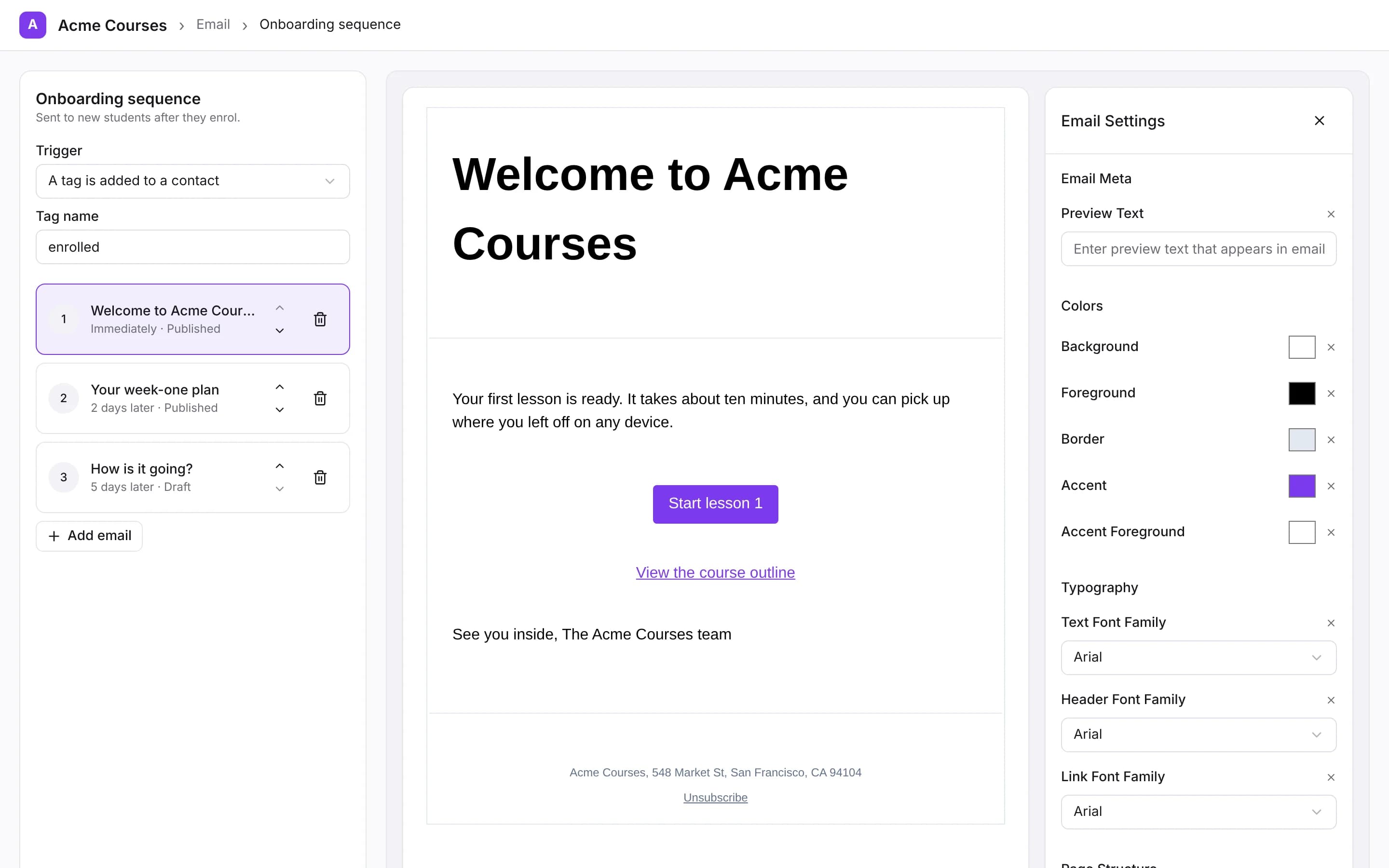
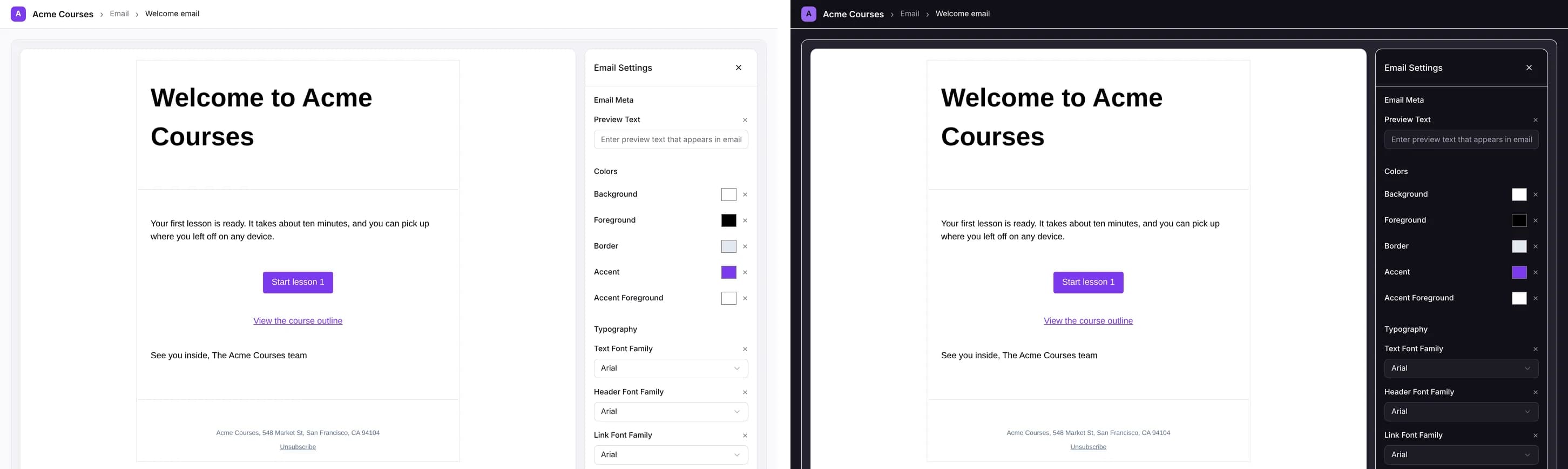
Two MIT-licensed React packages give you the editor and the building blocks for broadcasts, sequences, contacts and templates. They are controlled components: your app owns the state and the API calls, and they inherit your Tailwind theme.
EmailEditor
WYSIWYG block editor. Text, image, link and separator blocks. Register your own blocks. Plug in your own image uploader.
TemplateChooser
System and saved templates with real rendered previews, so customers start from something good.
SequenceEmailList
The steps of a sequence: select, reorder, delete with confirmation, add from a template.
TriggerPicker
Choose what enrols a contact: subscribed, tag added, tag removed.
ContactFilterBuilder
Segment builder with tag, email, subscription and signup-date conditions, plus saved segments.
TagEditor
Add and remove a contact's tags, with a picker of existing tags.
SubscriberList
Paginated subscribers of a broadcast or sequence, with optional profile links.
SequenceAnalytics
Sent, open rate, click rate and more for a broadcast or sequence.
EmailPreview
A scaled-down preview rendered through the same pipeline as outgoing mail.
Your theme. The components use your shadcn/Tailwind CSS variables (
--primary,--background,--radius...), so they match your brand without overrides.Your words. Every visible string is an optional prop with an English default. You can localise or reword anything without forking.
Your blocks.
EmailEditortakes ablocksarray and arenderContext, so you can add product-specific blocks such as "course card" or "event".renderEmailToHtmlturns the document into email-safe HTML.Your layout. These are building blocks, not fixed pages. Arrange them however your app needs.
"use client";
import { useState } from "react";
import { EmailEditor, defaultEmail, type Email } from "@sendlit/email-editor";
import "@sendlit/email-editor/styles.css";

export function NewsletterComposer() {
  const [email, setEmail] = useState<Email>(defaultEmail);
  // Save with your backend, which calls SendLit with the customer's team key
  return <EmailEditor email={email} onChange={setEmail} />;
}
Your customers' mail goes through your provider, with the hard parts done
Connect one shared mailbox for all customers, let customers connect their own provider, or mix the two per team. SendLit handles the work around sending that platforms usually build themselves.
Shared or bring-your-own, per customer
Each provisioning call sets useOrganizationDefault, teamEspEnabled and teamCanChangeDefault. A send never silently switches provider.
Bounces and complaints
Feedback adapters for Amazon SES (SNS), Resend, Postmark, SendGrid and Mailgun feed automatic suppression.
One-click unsubscribe
Marketing mail carries List-Unsubscribe and List-Unsubscribe-Post (RFC 8058), as Gmail and Yahoo require.
Domain checks
SPF, DKIM and DMARC lookups for each provider's From domain, with the exact records to add, which you can surface in your own "verify your domain" screen.
Your links, your domain
Each team can use its own tracking domain for open, click, unsubscribe and "view in browser" links.
Warm-up and safeguards
A new provider ramps up gradually and sends to the most engaged contacts first.
SendLit doesn't operate mail servers or IPs. Delivery, dedicated IPs and the per-email cost are between you and your provider.
Your brand on every screen and every email
No "Sent with SendLit" footer on Business (it is also off on Pro and self-hosted).
Provisioned teams have no SendLit login. Your customers use your app, with our components inside it.
Sender name and Reply-To per customer. From addresses come from the provider you connect.
Per-team tracking domain, so links in emails use the customer's or your domain.
Components follow your theme tokens and copy.
Hosted signup forms, the unsubscribe confirmation page and the web archive are served by SendLit. With a tracking domain, their links use your domain.
What you'd build yourself
Sending an email is the easy part. A customer-facing email product needs all of this, and every piece has edge cases.
| You'd need | With SendLit |
|---|---|
| A tenant model with isolated data and keys | POST /provisioning/teams, one team and key per customer |
| An email editor that outputs email-safe HTML | @sendlit/email-editor + renderEmailToHtml |
| Templates with previews | TemplateChooser, templates API |
| Contacts, tags, custom fields, segments | Contacts and segments API, ContactFilterBuilder, TagEditor |
| Broadcast scheduling and drip sequences | Sequences API, SequenceEmailList, TriggerPicker |
| Transactional sends with idempotency | POST /emails with idempotencyKey |
| A send queue with per-customer limits | Per-team daily/monthly quotas on your shared mailbox |
| Bounce and complaint ingestion for each provider | Adapters for SES, Resend, Postmark, SendGrid, Mailgun |
| A suppression list enforced before every send | Built in, with a suppressions API |
| Unsubscribe links and RFC 8058 headers | Built in |
| Open and click tracking, custom tracking domains | Built in, per team |
| SPF/DKIM/DMARC checks | Domain-authentication endpoint |
| Analytics per broadcast and sequence | Stats API, SequenceAnalytics |
| An audit trail of admin actions | Organization audit log |
Build the parts that make your product different. Use SendLit for the rest, and self-host it if you'd rather own every line.
How SendLit compares for platforms
| SendLit | Build on Resend or SES | EmailBuilder.js | Loops | |
|---|---|---|---|---|
| What it is | Email marketing layer with a tenant API and React UI | A sending API; you build the rest | MIT React editor only | Email platform for one SaaS's own users |
| A workspace per customer via API | ✓ POST /provisioning/teams | Build it (Resend: domain + key per customer; SES: tenants) | ✕ | ✕ No provisioning API found |
| Editor you can embed | ✓ MIT, React 19 | ✕ Build or buy one | ✓ MIT | ✕ |
| Broadcasts and sequences | ✓ | Build it (Resend's broadcasts live in Resend's dashboard) | ✕ | ✓ (in Loops' app) |
| Contacts and segments | ✓ API + components | Build it | ✕ | ✓ (in Loops' app) |
| Bounce/complaint suppression | ✓ | Provider events; you wire suppression | ✕ | ✓ Managed |
| Who sends | Your provider | Resend / SES | Nobody (editor only) | Loops |
| Outbound event webhooks | Not yet (poll the API) | ✓ | n/a | ✓ |
| Open source | ✓ AGPL-3.0 core, MIT components | n/a | ✓ MIT (little activity since Feb 2026) | ✕ |
| Price shape | $99/mo Business (600k emails, 15 teams) + your provider | Per email + your build time | Free + your build time | Per subscribed contact, from $49/mo |
| Pick it when | You want customers to run email inside your product, on your provider | You only need transactional mail, or have a team to build the product layer | You only need an editor and will build sending, lists and automation | You need email for your own company, not for your customers |
SendLit
- What it is
- Email marketing layer with a tenant API and React UI
- A workspace per customer via API
- ✓
POST /provisioning/teams - Editor you can embed
- ✓ MIT, React 19
- Broadcasts and sequences
- ✓
- Contacts and segments
- ✓ API + components
- Bounce/
complaint suppression - ✓
- Who sends
- Your provider
- Outbound event webhooks
- Not yet (poll the API)
- Open source
- ✓ AGPL-3.0 core, MIT components
- Price shape
- $99/mo Business (600k emails, 15 teams) + your provider
- Pick it when
- You want customers to run email inside your product, on your provider
Build on Resend or SES
- What it is
- A sending API; you build the rest
- A workspace per customer via API
- Build it (Resend: domain + key per customer; SES: tenants)
- Editor you can embed
- ✕ Build or buy one
- Broadcasts and sequences
- Build it (Resend's broadcasts live in Resend's dashboard)
- Contacts and segments
- Build it
- Bounce/
complaint suppression - Provider events; you wire suppression
- Who sends
- Resend / SES
- Outbound event webhooks
- ✓
- Open source
- n/a
- Price shape
- Per email + your build time
- Pick it when
- You only need transactional mail, or have a team to build the product layer
EmailBuilder.js
- What it is
- MIT React editor only
- A workspace per customer via API
- ✕
- Editor you can embed
- ✓ MIT
- Broadcasts and sequences
- ✕
- Contacts and segments
- ✕
- Bounce/
complaint suppression - ✕
- Who sends
- Nobody (editor only)
- Outbound event webhooks
- n/a
- Open source
- ✓ MIT (little activity since Feb 2026)
- Price shape
- Free + your build time
- Pick it when
- You only need an editor and will build sending, lists and automation
Loops
- What it is
- Email platform for one SaaS's own users
- A workspace per customer via API
- ✕ No provisioning API found
- Editor you can embed
- ✕
- Broadcasts and sequences
- ✓ (in Loops' app)
- Contacts and segments
- ✓ (in Loops' app)
- Bounce/
complaint suppression - ✓ Managed
- Who sends
- Loops
- Outbound event webhooks
- ✓
- Open source
- ✕
- Price shape
- Per subscribed contact, from $49/mo
- Pick it when
- You need email for your own company, not for your customers
Based on public product pages, October 2026. SendLit's price excludes your email provider's charges.
Provisioning is on Business
Business, $99/month ($990/year)
600,000 emails a month across all teams · 15 teams · Provisioning API and organization keys · Shared organization mailbox · No SendLit footer · Unlimited contacts and team members · Email support.
More than 15 customers or 600,000 emails? Talk to us about Enterprise.
Self-host for free: every feature, unlimited teams. You run the servers.
You pay your email provider for delivery. Amazon SES costs about $40 for 400,000 emails.
Every feature in the API, typed end to end
TypeScript SDK
npm install sendlit. Typed from the same contract the API validates against. Retries are built in.
REST + OpenAPI
/openapi.json and interactive docs for every endpoint.
MCP server
Your customers' AI assistants can manage their own team's contacts, templates and sends with OAuth or the team's key. (Provisioning stays REST-only.)
What's not here yet
Outbound webhooks for delivered, bounced and unsubscribed events (tracked in issue #52). For now, poll
GET /delivery-eventsandGET /suppressions.Custom-event triggers for sequences (issue #136). Today sequences start on subscribe, tag added or tag removed.
Browser tokens. Call SendLit from your backend and keep keys server-side.
Inviting your customers' staff into SendLit. Provisioned teams are API-only by design.
Subscriber preference center (issue #54).
FAQ
Does SendLit send the emails?
No. Every hosted plan sends through a provider you connect: Amazon SES, any SMTP server, Postmark, Resend, SendGrid or Mailgun. You pay them directly, and the sending reputation stays yours.
Do my customers need their own email provider?
No. Connect one shared organization mailbox and every team can use it, with per-team limits. You can also let some customers connect their own provider (teamEspEnabled).
How is one customer's data kept apart from another's?
Each customer is a separate team with its own contacts, templates, sequences, suppressions and API key. A team key can only reach its own team. Organization keys can't read team data through the provisioning API.
What happens if one customer sends spam?
Suspend that team with one call and everyone else keeps sending. Bounces and complaints are suppressed automatically, and per-team quotas cap how much any one customer can send through your shared mailbox.
Can I style the components to match my product?
Yes. They use your Tailwind/shadcn theme variables, every label is a prop, and you can add your own editor blocks.
Which React versions are supported?
React 19 (^19.2.0) with Tailwind v3 or v4. The packages are at 0.2.x, so pin your versions.
Can I call SendLit from the browser?
Not directly. Keep the organization and team keys on your server and proxy the calls your components need.
How many customers can I have?
Business includes 15 teams. For more, talk to us about Enterprise, or self-host with no team limit.
What does it cost?
Business is $99 a month or $990 a year for 600,000 emails across all teams, plus your provider's own charges.
Can I see what's happening in a customer's team?
Organization owners and admins can see transactional mail activity per team and can choose to enter a team to help. Every entry is recorded in the audit log.
Can I leave?
Yes. The core is open source (AGPL-3.0) and runs with one docker compose up, and the components are MIT.
Can my customers use AI assistants with it?
Yes. The MCP server is team-scoped, so each customer's assistant only reaches that customer's team.
Give your customers email marketing this week
Provision a team, drop in the editor, connect your provider.